
Sunday, January 12, 2020
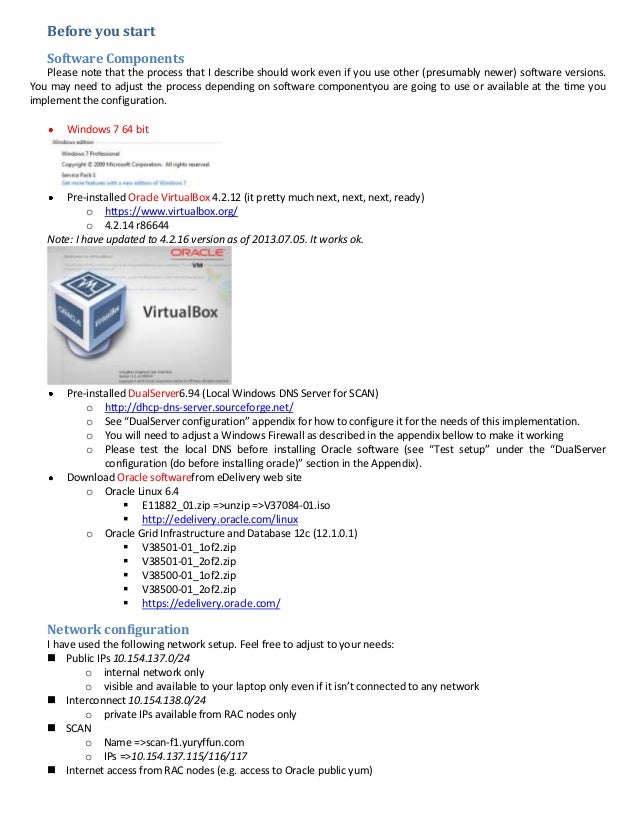
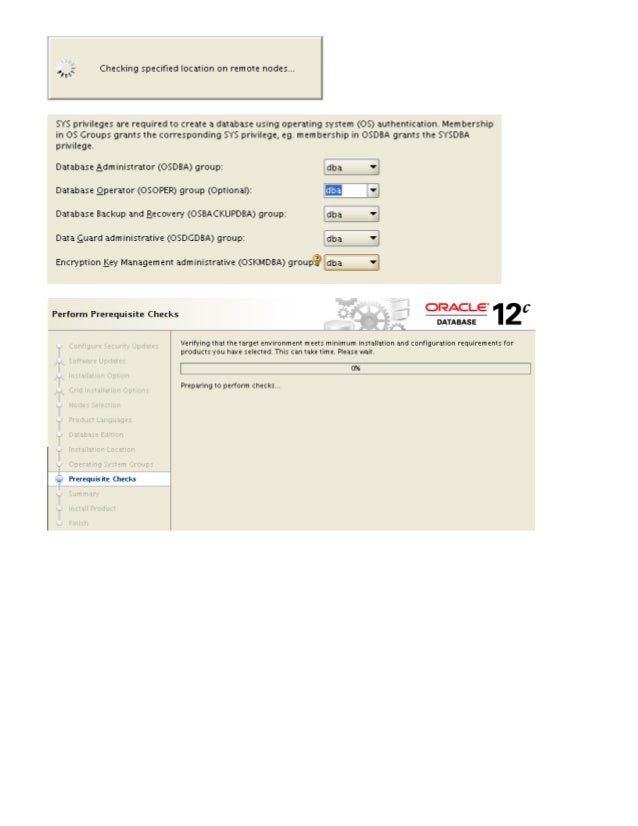
![[root@ol6r01 yum.repos.d]#
time yum update -y
Loaded plugins: security
Setting up Update Process
No Packages marked for Up...](https://image.slidesharecdn.com/2nodesoracle12craconyourlaptopvirtualboxstepbystepguide1-0-130627143310-phpapp02/95/oracle-12c-rac-on-your-laptop-step-by-step-implementation-guide-10-6-638.jpg?cb=1372982137)


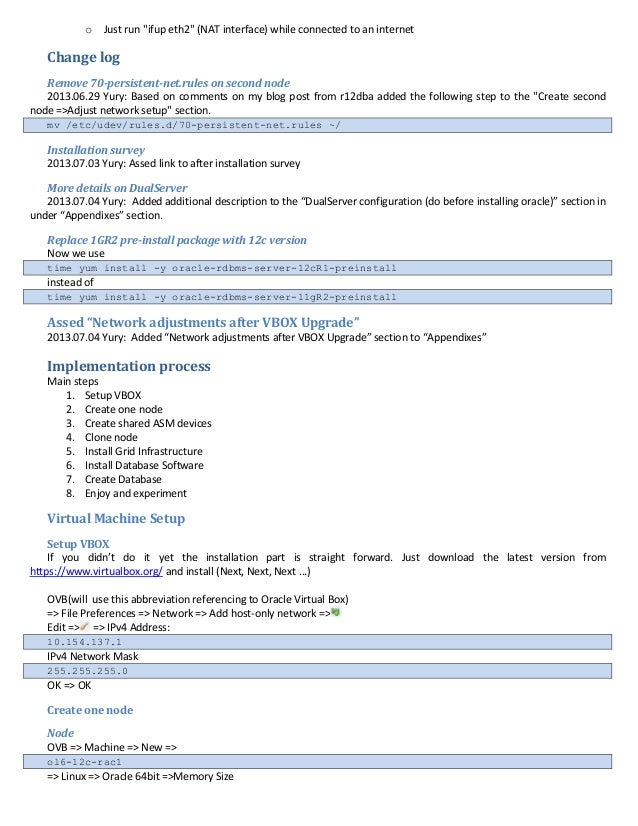
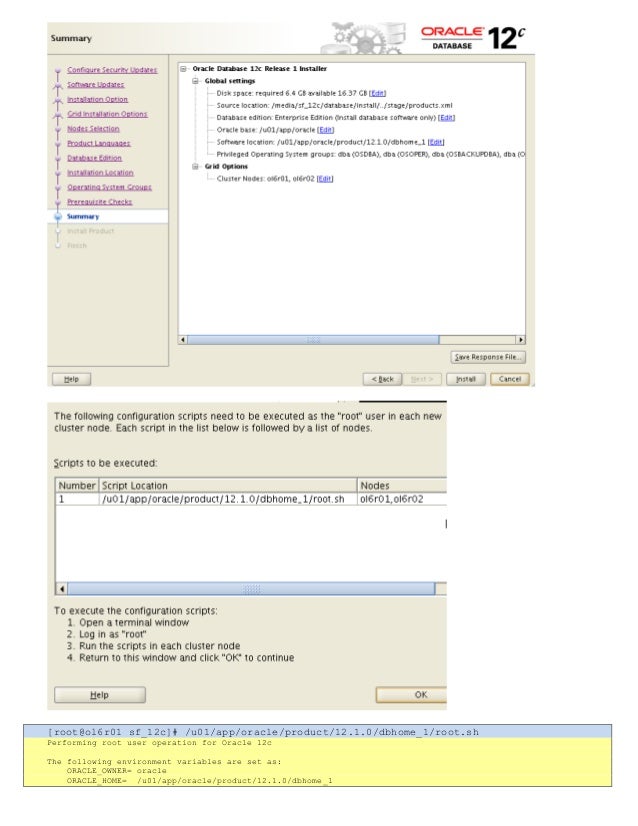
![Building the OpenGL support module [ OK ]
Doing non-kernel setup of the Guest Additions [ OK ]
Starting the VirtualBox Gue...](https://image.slidesharecdn.com/2nodesoracle12craconyourlaptopvirtualboxstepbystepguide1-0-130627143310-phpapp02/95/oracle-12c-rac-on-your-laptop-step-by-step-implementation-guide-10-10-638.jpg?cb=1372982137)
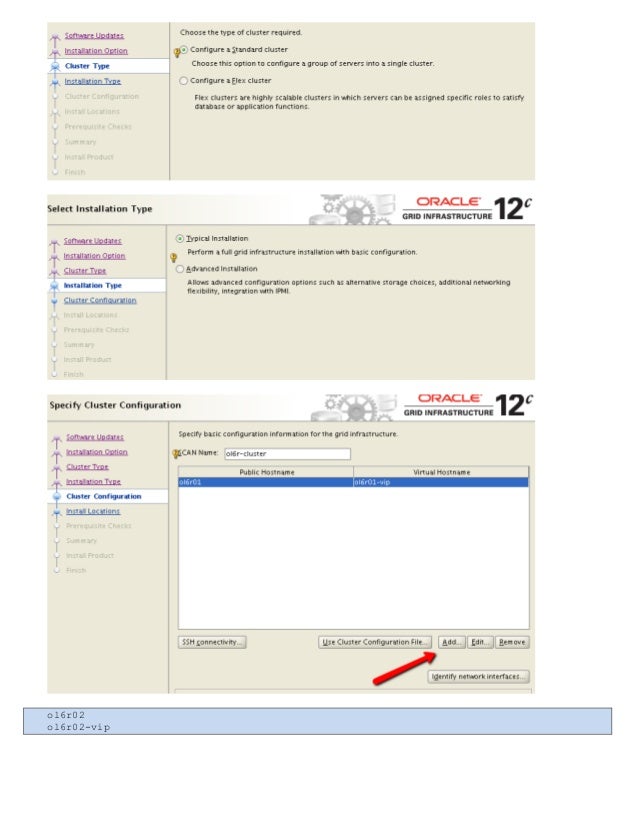
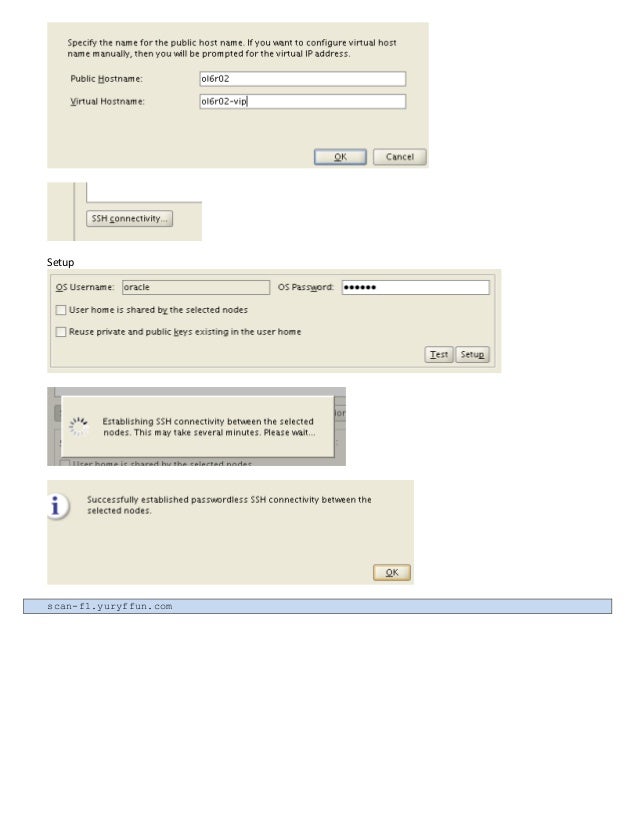
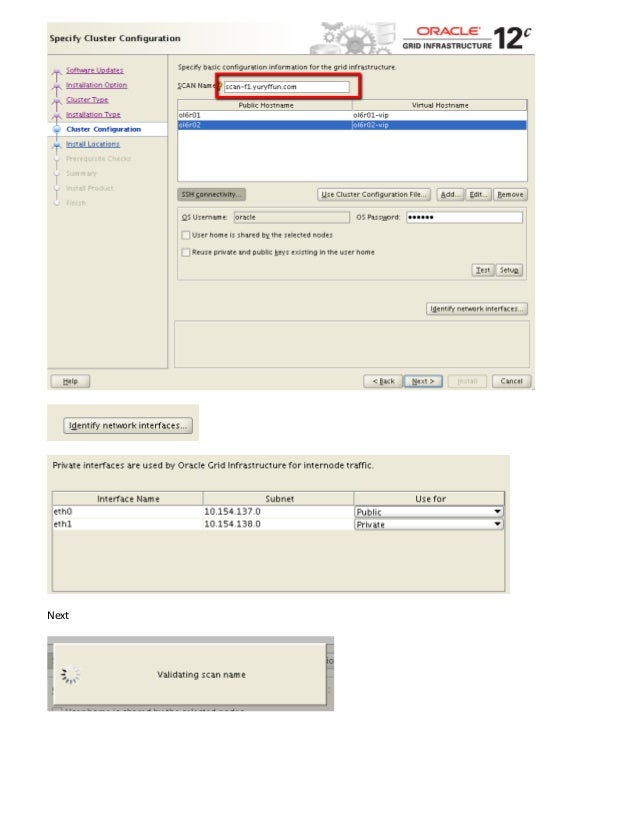
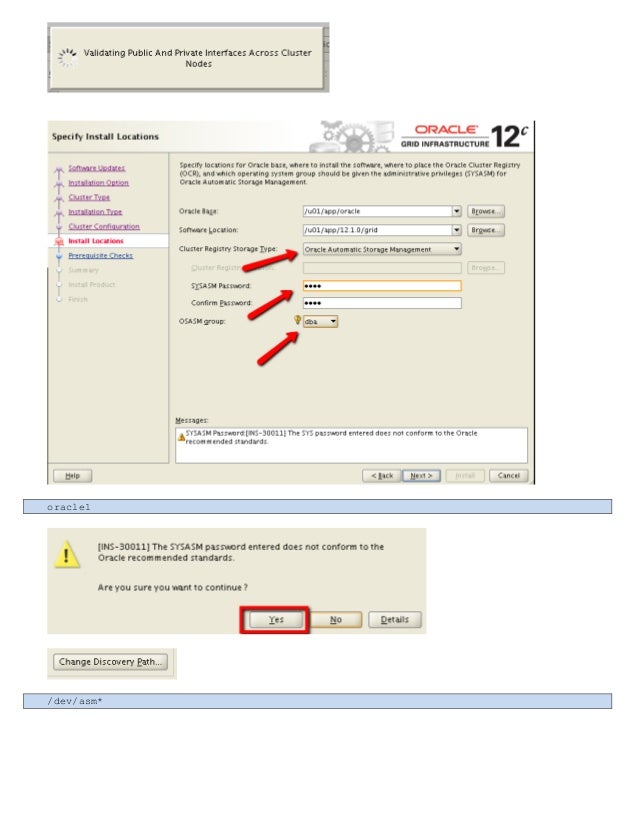
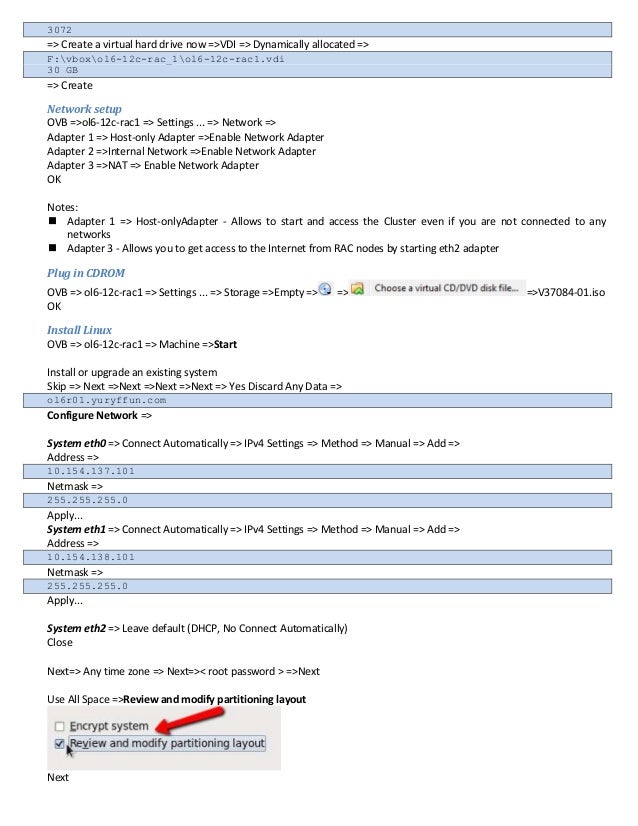
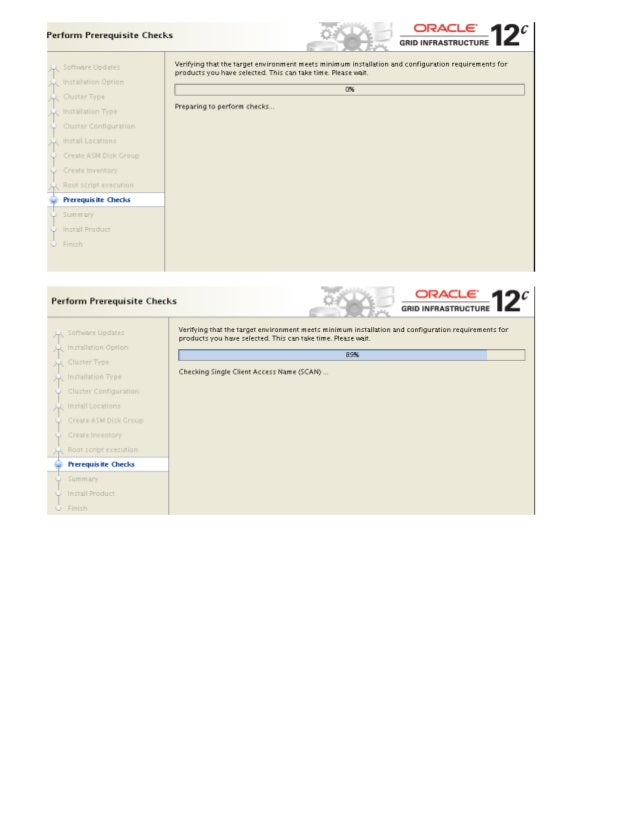
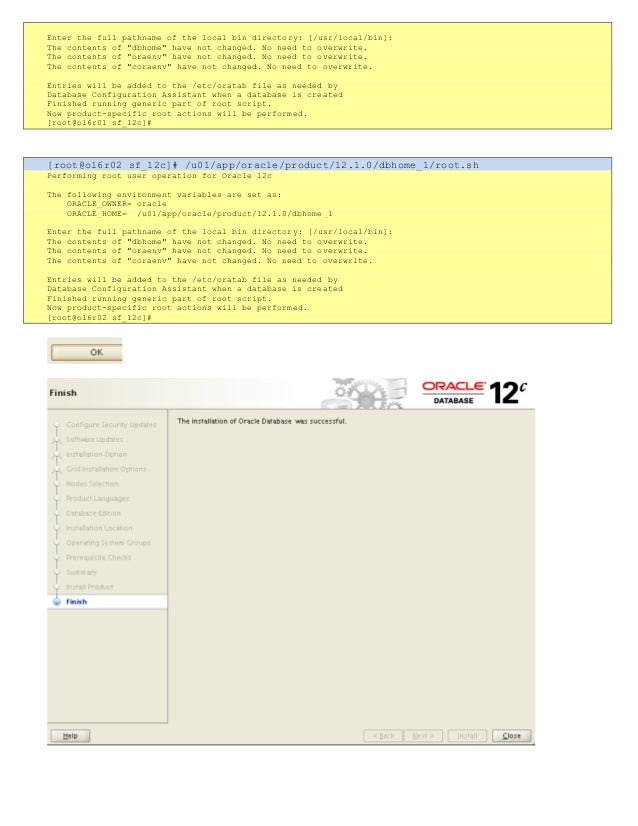
![puttyoracle@10.154.137.101
ORAENV_ASK=NO; ORACLE_SID=+ASM1; .oraenv
[oracle@ol6r01 ~]$ crsctl stat res -t
----------------...](https://image.slidesharecdn.com/2nodesoracle12craconyourlaptopvirtualboxstepbystepguide1-0-130627143310-phpapp02/95/oracle-12c-rac-on-your-laptop-step-by-step-implementation-guide-10-22-638.jpg?cb=1372982137)

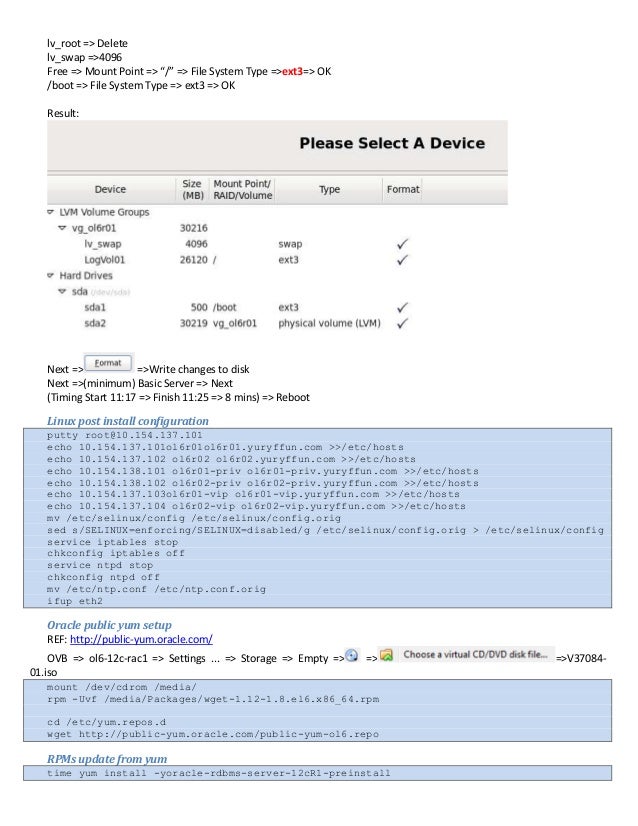
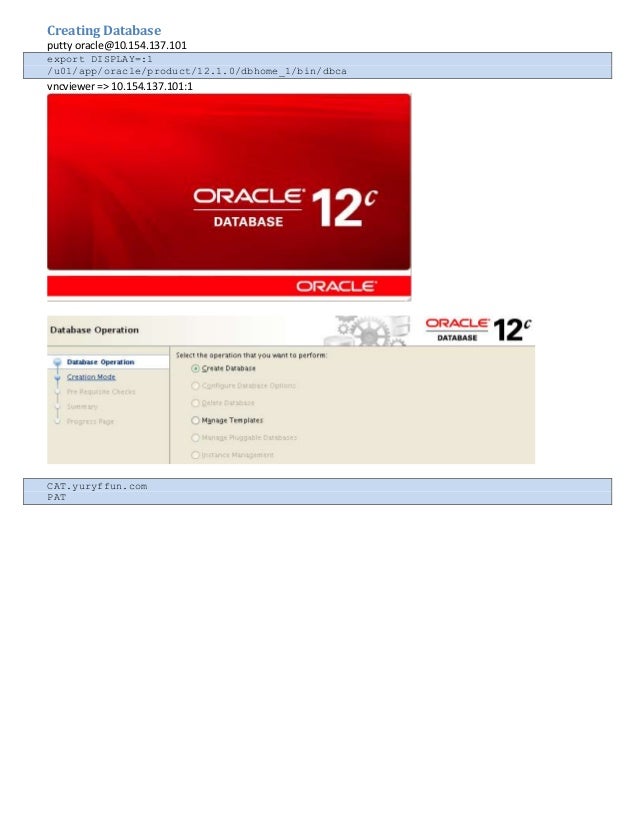
![[root@ol6r01 sf_12c]# /u01/app/oracle/product/12.1.0/dbhome_1/root.sh
Performing root user operation for Oracle 12c
The fo...](https://image.slidesharecdn.com/2nodesoracle12craconyourlaptopvirtualboxstepbystepguide1-0-130627143310-phpapp02/95/oracle-12c-rac-on-your-laptop-step-by-step-implementation-guide-10-25-638.jpg?cb=1372982137)
![Enter the full pathname of the local bin directory: [/usr/local/bin]:
The contents of "dbhome" have not changed. No need t...](https://image.slidesharecdn.com/2nodesoracle12craconyourlaptopvirtualboxstepbystepguide1-0-130627143310-phpapp02/95/oracle-12c-rac-on-your-laptop-step-by-step-implementation-guide-10-26-638.jpg?cb=1372982137)

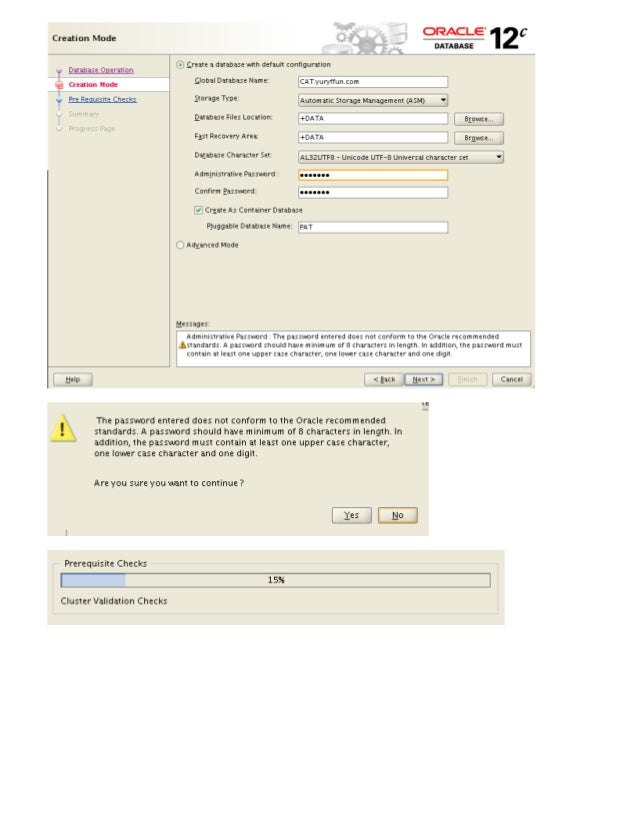
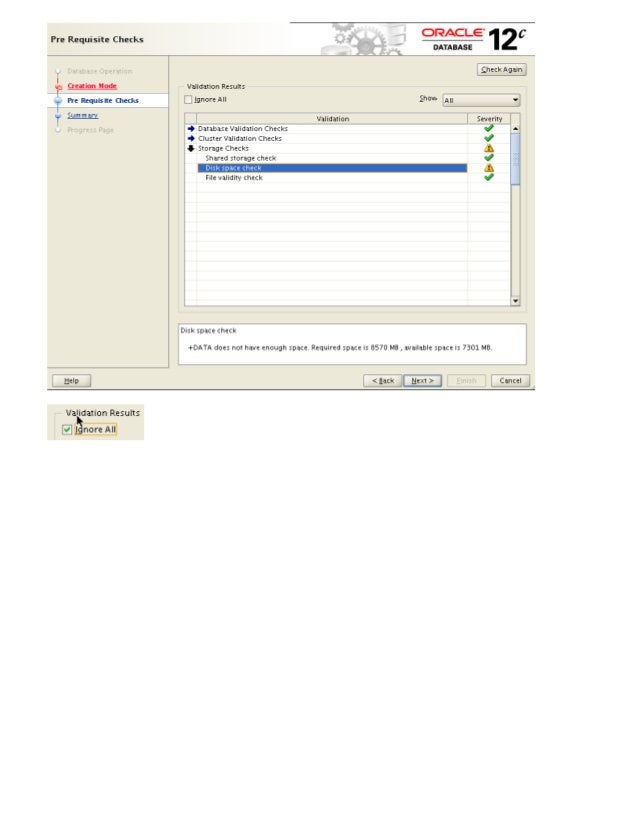
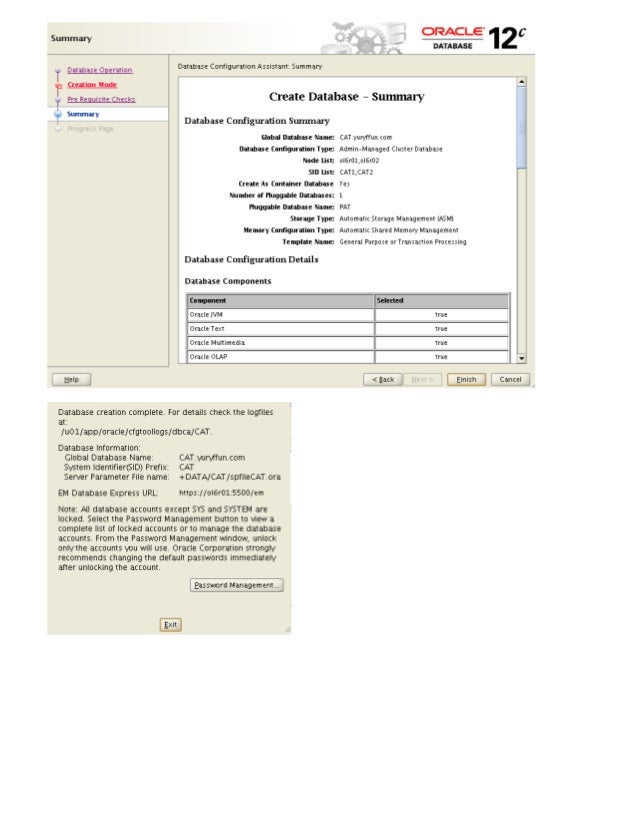
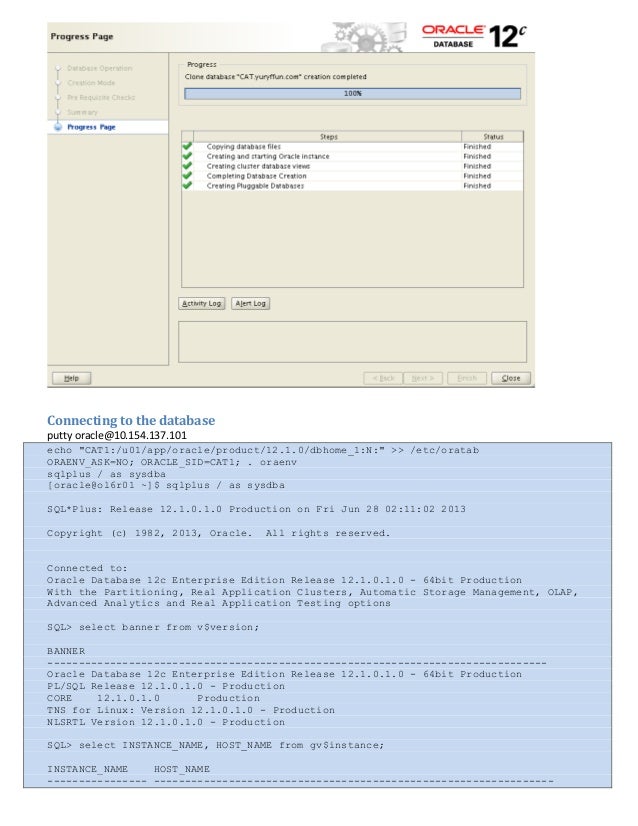

Wednesday, January 8, 2020
ADVANCED LINUX INTERVIEW QUESTIONS & ANSWERS
ADVANCED LINUX INTERVIEW QUESTIONS & ANSWERS
-
Answer :When you have a process in progress which handle your prompt, there are some signals (orders) that we can send to theses process to indicate what we need:Control+C sends SIGINT which will interrupt the application. Usually causing it to abort, but a process is able to intercept this signal and do whatever it likes: for instance, from your Bash prompt, try hitting Ctrl-C. In Bash, it just cancels whatever you've typed and gives you a blank prompt (as opposed to quitting Bash)Control+Z sends SIGTSTP to a foreground application, effectively putting it in the background on suspended mode. This is very useful when you want the application to continue its process while you are doing another job in the current shell. When you finish the job, you can go back into the application by running fg (or %x where x is the job number as shown in jobs).
-
Answer :Traceroute is a program that shows you the route taken by packets through a network. It traces the route of packets from source to destination. It is commonly used when your network doesn’t work as well and you want to examine where can be the problem. Traceroute sends a UDP packet to the destination taking advantage of ICMP’s messages. ICMP has two types of messages: error-reporting messages and query messages. Query messages are generally used to diagnose network problems (the ping tool uses ICMP’s query messages). The error-reporting messages as the name suggest report errors if any in the IP packet; it uses Destination unreachable and Time exceeded errors message. It works by theses steps:
- Traceroute creates a UDP packet from the source to destination with a TTL(Time-to-live) = 1
- The UDP packet reaches the first router where the router decrements the value of TTL by 1, thus making our UDP packet’s TTL = 0 and hence the packet gets dropped.
- Noticing that the packet got dropped, it sends an ICMP message (Time exceeded) back to the source.
- Traceroute makes a note of the router’s address and the time taken for the round-trip.
- It sends two more packets in the same way to get an average value of the round-trip time. Usually, the first round-trip takes longer than the other two due to the delay in ARP finding the physical address, the address stays in the ARP cache during the second and the third time and hence the process speeds up.
- The steps that have occurred up til now, occur again and again until the destination has been reached. The only change that happens is that the TTL is incremented by 1 when the UDP packet is to be sent to next router/host.
- Once the destination is reached, Time exceeded ICMP message is NOT sent back this time because the destination has already been reached.
- But, the UDP packet used by Traceroute specifies the destination port number to be one that is not usually used for UDP. Hence, when the destination computer verifies the headers of the UDP packet, the packet gets dropped due to the improper port being used and an ICMP message (this time – Destination Unreachable) is sent back to the source.
- When Traceroute encounters this message, it understands that the destination has been reached. Even the destination is reached 3 times to get the average of the round-trip time.
Shell Scripting Interview Questions
-
Answer :nscd is a daemon that provides a cache for the most common name service requests. When resolving a user, group, host, service..., the process will first try to connect to the nscd socket (something like /var/run/nscd/socket).If nscd has died, the connect will fail, and so nscd won't be used and that should not be a problem.If it's in a hung state, then the connect may hang or succeed. If it succeeds the client will send its request (give IP address for www.google.com, passwd entries...). Now, you can configure nscd to disable caching for any type of database (for instance by having enable-cache hosts no in /etc/nscd.conf for the hosts database).However, if nscd is in a hung state, it may not be able to even give that simple won't do answer, so that won't necessarily help. nscd is a caching daemon, it's meant to improve performance. Disabling it would potentially make those lookups slower. However, that's only true for some kind of databases. For instance, if user/service/group databases are only in small files (/etc/passwd, /etc/group, /etc/services), then using nscd for those will probably bring little benefit if any. nscd will be useful for the hosts database.
-
Answer :command > file.log 2>&1 : Redirect stderr to "where stdout is currently going". In this case, that is a file opened in append mode. In other words, the &1 reuses the file descriptor which stdout currently uses.command 2>&1 | tee -a file.txt
-
Answer :The Random Number Generator gathers environmental noise from device drivers and other sources into entropy pool. It also keeps an estimate of Number of bits of noise in entropy pool. It is from this entropy pool, random numbers are generated./dev/random will only return Random bytes from entropy pool. If entropy pool is empty, reads to /dev/random will be blocked until additional environmental noise is gathered. This is suited to high-quality randomnesses, such as one-time pad or key generation./dev/urandom will return as many random bytes as requested. But if the entropy pool is empty, it will generate data using SHA, MD5 or any other algorithm. It never blocks the operation. Due to this, the values are vulnerable to theoretical cryptographic attack, though no known methods exist.For cryptographic purposes, you should really use /dev/random because of nature of data it returns. Possible waiting should be considered as an acceptable tradeoff for the sake of security, IMO. When you need random data fast, you should use /dev/urandom of course.Both /dev/urandom and /dev/random are using the exact same CSPRNG (a cryptographically secure pseudorandom number generator). They only differ in very few ways that have nothing to do with “true” randomness and /dev/urandom is the preferred source of cryptographic randomness on UNIX-like systems.
Linux Interview Questions
-
Answer :Sometimes sysadmins Linux need to save data safety and to this, it is recommended to compress the data. We have some methods or commands for compression on Linux. So frequently asked questions could be why should I use this command instead of another one example, why should I use tar instead of zip. To answer this, you should know the difference between the two.tar is only an archiver whereas zip is an archiver and compressor. Tar uses gzip and bzip2 to achieve compression. With using tar command, we preserve metadata information of file and directories like seiuid, setgid and sticky bit information which are very important while zip doesn't preserve theses information. It is very important for criticals information. Other advantages of using tar is the fact that it assembles all the files into a single file to compress directly while zip compress file by file.
-
Answer :In the work of sysadmin, we can sometimes want to check open ports on our remote server. But if we are on a machine where can not install nmap or we don't have the possibility to install a tool which can help us to check open ports, what could we do?We can check it with bash using /dev/tcp or /dev/udp to open a TCP or UDP connection to the associated socket.The command behavior is:$ echo > /dev/tcp/$host/$portwe can associate a message to display if the port is opened$ echo > /etc/tcp/8.8.8.8/53 && echo "OPEN PORT"OPEN PORT$ echo > /dev/tcp/8.8.8.8/80 && echo "GOOD" || echo "NOT OPEN"-bash: connect: Connection timed out-bash: /dev/tcp/8.8.8.8/80: Connection timed outNOT OPEN
-
Answer :Systemd is well designed. It was conceived from the top, not just to fix bugs, but to be a correct implementation of the base system services. A systemd, may refer to all the packages, utilities and libraries around daemon. It was designed to overcome the shortcomings of init. It itself is a background process which is designed to start processes in parallel, thus reducing the boot time and computational overhead. It has a lot other features as compared to init while Sysvinit was never designed to cope with the dynamic/event-based architecture of the current Linux kernel. The only reason why we still use it today is the cost of a migration.Systemd ships a growing number of useful, unified command-line interfaces for system settings and control (timedatectl, bootctl, hostnamectl, loginctl, machinectl, kernel-install, localectl). In Debian, they use the existing configuration files without breaking compatibility.Systemd makes the boot process much simpler, entirely removing the need to specify dependencies in many cases thanks to D-Bus activation, socket activation, file/inotify activation and udev integration.Systemd supports SELinux integration while SysV doesn'tSystemd can handle the boot process from head to toe, without needing to use any of the existing shell scripts. Systemd extends the logging features of the system in many ways with journald, and can remain integrated with the existing rsyslog daemon. Logs are in a structured format, attributed to filename, line of code, PID and service. They include the early boot (starting from initramfs). They can be quickly filtered and programmatically accessed through an efficient interface.Systemd unit files, unlike SysV scripts, can usually be shipped by upstream, or at least shared with other distributions (already more than 1000 existing unit files in Fedora) without any changes, the Debian specifics being handled by systemd itself.Systemd is incredibly fast (1 second to boot). It was not designed with speed in mind, but doing things correctly avoids all the delays currently incurred by the boot process.The transition plan is easy, since existing init scripts are treated as first-class services: scripts can depend (using LSB headers) on units, units can depend on scripts. More than 99% of init scripts can be used without a modification.It is not just init. It unifies, in fewer lines of code, everything that is related to starting services and managing session groups: user login, cron jobs, network services (inetd), virtual TTY management… Having a single system to handle all of that allows us to remove a lot of cruft, and to use less memory on the system.
-
Answer :For Linux sysadmins, it is frequent to access servers by ssh. But are we sure the communication established is really good secured?There some additionals very simple steps that can be taken to initially harden the SSH service, such as:
- Disabling root login, and even password-based logins will further reinforce the security of the server.
- Disabling password-based logins and allow key based logins which are secured but can be taken further by restricting their use from only certain IP addresses.
- Changing the standard port to something other significantly decreases random brute force attempts from the internet
- Forcing the service to use only version 2 of the protocol will introduce both security and feature enhancement.
- The whitelist approach can be taken, where only the users that belong to a certain list can log in via SSH to the server.
-
Answer :LVM is a logical volume manager. It requires to resize filesystem size. This size can be extended and reduced using lvextend and lvreduce commands respectively. You can think of LVM as dynamic partitions, meaning that you can create/resize/delete LVM partitions from the command line while your Linux system is running: no need to reboot the system to make the kernel aware of the newly-created or resized partitions. LVM also provides:You can extend over more than one disk if you have more than one hard-disk. They are not limited by the size of one single disk, rather by the total aggregate size.You can create a (read-only) snapshot of any LV (Logical Volume). You can revert the original LV to the snapshot at a later time, or delete the snapshot if you no longer need it. This is handy for server backups for instance (you cannot stop all your applications from writing, so you create a snapshot and backup the snapshot LV), but can also be used to provide a "safety net" before a critical system upgrade (clone the root partition, upgrade, revert if something went wrong).you can also set up writeable snapshots too. It allows you to freeze an existing Logical Volume in time, at any moment, even while the system is running. You can continue to use the original volume normally, but the snapshot volume appears to be an image of the original, frozen in time at the moment you created it. You can use this to get a consistent filesystem image to back up, without shutting down the system. You can also use it to save the state of the system, so that you can later return to that state if you mess things up. You can even mount the snapshot volume and make changes to it, without affecting the original.
RED HAT CLUSTER INTERVIEW QUESTIONS & ANSWERS
-
RED HAT CLUSTER INTERVIEW QUESTIONS & ANSWERS
-
Answer :A cluster is two or more computers (called nodes or members) that work together to perform a task.There are four major types of clusters:
- Storage
- High availability
- Load balancing
- High performance
-
Answer :
- Storage clusters provide a consistent file system image across servers in a cluster, allowing the servers to simultaneously read and write to a single shared file system.
- A storage cluster simplifies storage administration by limiting the installation and patching of applications to one file system.
- The High Availability Add-On provides storage clustering in conjunction with Red Hat GFS2
-
Answer :
- High availability clusters provide highly available services by eliminating single points of failure and by failing over services from one cluster node to another in case a node becomes inoperative.
- Typically, services in a high availability cluster read and write data (via read-write mounted file systems).
- A high availability cluster must maintain data integrity as one cluster node takes over control of a service from another cluster node.
- Node failures in a high availability cluster are not visible from clients outside the cluster.
- High availability clusters are sometimes referred to as failover clusters.
-
Answer :
- Load-balancing clusters dispatch network service requests to multiple cluster nodes to balance the request load among the cluster nodes.
- Load balancing provides cost-effective scalability because you can match the number of nodes according to load requirements. If a node in a load-balancing cluster becomes inoperative, the load-balancing software detects the failure and redirects requests to other cluster nodes.
- Node failures in a load-balancing cluster are not visible from clients outside the cluster.
- Load balancing is available with the Load Balancer Add-On.
-
Answer :
- High-performance clusters use cluster nodes to perform concurrent calculations.
- A high-performance cluster allows applications to work in parallel, therefore enhancing the performance of the applications.
- High performance clusters are also referred to as computational clusters or grid computing.
-
Answer :A cluster configured with qdiskd supports a maximum of 16 nodes. The reason for the limit is because of scalability; increasing the node count increases the amount of synchronous I/O contention on the shared quorum disk device.
-
Answer :The minimum size of the block device is 10 Megabytes.
-
Answer :In Red Hat 4 :
- service ccsd start
- service cman start
- service fenced start
- service clvmd start (If CLVM has been used to create clustered volumes)
- service gfs start
- service rgmanager start
In RedHat 5 :- service cman start
- service clvmd start
- service gfs start
- service rgmanager start
In Red Hat 6 :- service cman start
- service clvmd start
- service gfs2 start
- service rgmanager start
-
Answer :In Red Hat 4 :
- service rgmanager stop
- service gfs stop
- service clvmd stop
- service fenced stop
- service cman stop
- service ccsd stop
In Red Hat 5- service rgmanager stop
- service gfs stop
- service clvmd stop
- service cman stop
In Red Hat 6 :- service rgmanager stop
- service gfs2 stop
- service clvmd stop
- service cman stop
-
Answer :
- Better performance for heavy usage in a single directory
- Faster synchronous I/O operations
- Faster cached reads (no locking overhead)
- Faster direct I/O with preallocated files (provided I/O size is reasonably large, such as 4M blocks)
- Faster I/O operations in general
- Faster Execution of the df command, because of faster statfs calls
- Improved atime mode to reduce the number of write I/O operations generated by atime when compared with GFS
- GFS2 supports the following features.
- extended file attributes (xattr)
- the lsattr() and chattr() attribute settings via standard ioctl() calls
- nanosecond timestamps
- GFS2 uses less kernel memory.
- GFS2 requires no metadata generation numbers.
- Allocating GFS2 metadata does not require reads. Copies of metadata blocks in multiple journals are managed by revoking blocks from the journal before lock release.
- GFS2 includes a much simpler log manager that knows nothing about unlinked inodes or quota changes.
- The gfs2_grow and gfs2_jadd commands use locking to prevent multiple instances running at the same time.
- The ACL code has been simplified for calls like creat() and mkdir().
- Unlinked inodes, quota changes, and statfs changes are recovered without remounting the journal.
-
Answer :
- GFS2 is based on 64 bit architecture, which can theoretically accommodate an 8 EB file system.
- However, the current supported maximum size of a GFS2 file system for 64-bit hardware is 100 TB.
- The current supported maximum size of a GFS2 file system for 32-bit hardware for Red Hat Enterprise Linux Release 5.3 and later is 16 TB.
NOTE: It is better to have 10 1TB file systems than one 10TB file system. -
Answer :A journaling filesystem is a filesystem that maintains a special file called a journal that is used to repair any inconsistencies that occur as the result of an improper shutdown of a computer.In journaling file systems, every time GFS2 writes metadata, the metadata is committed to the journal before it is put into place.This ensures that if the system crashes or loses power, you will recover all of the metadata when the journal is automatically replayed at mount time.GFS2 requires one journal for each node in the cluster that needs to mount the file system. For example, if you have a 16-node cluster but need to mount only the file system from two nodes, you need only two journals. If you need to mount from a third node, you can always add a journal with the gfs2_jadd command.
- Answer :When you run mkfs.gfs2 without the size attribut for journal to create a GFS2 partition, by default a 128MB size journal is created which is enough for most of the applicationsIn case you plan on reducing the size of the journal, it can severely affect the performance. Suppose you reduce the size of the journal to 32MB it does not take much file system activity to fill an 32MB journal, and when the journal is full, performance slows because GFS2 has to wait for writes to the storage.
-
Answer :Quorum Disk is a disk-based quorum daemon, qdiskd, that provides supplemental heuristics to determine node fitness.With heuristics you can determine factors that are important to the operation of the node in the event of a network partitionFor a 3 node cluster a quorum state is present untill 2 of the 3 nodes are active i.e. more than half. But what if due to some reasons the 2nd node also stops communicating with the the 3rd node? In that case under a normal architecture the cluster would dissolve and stop working. But for mission critical environments and such scenarios we use quorum disk in which an additional disk is configured which is mounted on all the nodes with qdiskd service running and a vote value is assigned to it.So suppose in above case I have assigned 1 vote to qdisk so even after 2 nodes stops communicating with 3rd node, the cluster would have 2 votes (1 qdisk + 1 from 3rd node) which is still more than half of vote count for a 3 node cluster. Now both the inactive nodes would be fenced and your 3rd node would be still up and running being a part of the cluster.
-
Answer :This is a service termed as Resource Group ManagerRGManager manages and provides failover capabilities for collections of cluster resources called services, resource groups, or resource treesit allows administrators to define, configure, and monitor cluster services. In the event of a node failure, rgmanager will relocate the clustered service to another node with minimal service disruption
-
Answer :
- luci is the server component of the Conga administration utility
- Conga is an integrated set of software components that provides centralized configuration and management of Red Hat clusters and storage
- luci is a server that runs on one computer and communicates with multiple clusters and computers via ricci
- ricci is the client component of the Conga administration utility
- ricci is an agent that runs on each computer (either a cluster member or a standalone computer) managed by Conga
- This service needs to be running on all the client nodes of the cluster.
-
Answer :
- This is an abbreviation used for Cluster Manager.
- CMAN is a distributed cluster manager and runs in each cluster node.
- It is responsible for monitoring, heartbeat, quorum, voting and communication between cluster nodes.
- CMAN keeps track of cluster quorum by monitoring the count of cluster nodes.
-
Answer :
- IP Port no.
- Protocol
- Component
- 5404,5405
- UDP
- corosync/cman
- 11111
- TCP
- ricci
- 21064
- TCP
- dlm (Distributed Lock Manager)
- 16851
- TCP
- Modclustered
- 8084
- TCP
- luci
- 4196,4197
- TCP
- rgmanager
- Answer :The use of NetworkManager is not supported on cluster nodes. If you have installed NetworkManager on your cluster nodes, you should either remove it or disable it.# service NetworkManager stop# chkconfig NetworkManager offThe cman service will not start if NetworkManager is either running or has been configured to run with the chkconfig command
-
Answer :clusvcadm -r service_name -m node_name
- Answer :
- We say a cluster has quorum if a majority of nodes are alive, communicating, and agree on the active cluster members. For example, in a thirteen-node cluster, quorum is only reached if seven or more nodes are communicating. If the seventh node dies, the cluster loses quorum and can no longer function.
- A cluster must maintain quorum to prevent split-brain issues.
- If quorum was not enforced, quorum, a communication error on that same thirteen-node cluster may cause a situation where six nodes are operating on the shared storage, while another six nodes are also operating on it, independently. Because of the communication error, the two partial-clusters would overwrite areas of the disk and corrupt the file system.
- With quorum rules enforced, only one of the partial clusters can use the shared storage, thus protecting data integrity.
- Quorum doesn't prevent split-brain situations, but it does decide who is dominant and allowed to function in the cluster.
- quorum can be determined by a combination of communicating messages via Ethernet and through a quorum disk.
-
Answer :Tie-breakers are additional heuristics that allow a cluster partition to decide whether or not it is quorate in the event of an even-split - prior to fencing.With such a tie-breaker, nodes not only monitor each other, but also an upstream router that is on the same path as cluster communications. If the two nodes lose contact with each other, the one that wins is the one that can still ping the upstream router.That is why, even when using tie-breakers, it is important to ensure that fencing is configured correctly.CMAN has no internal tie-breakers for various reasons. However, tie-breakers can be implemented using the API.
-
Answer :
- Fencing is the disconnection of a node from the cluster's shared storage.
- Fencing cuts off I/O from shared storage, thus ensuring data integrity.
- The cluster infrastructure performs fencing through the fence daemon, fenced.
- When CMAN determines that a node has failed, it communicates to other cluster-infrastructure components that the node has failed.
- fenced, when notified of the failure, fences the failed node.
-
Answer :
- Power fencing : fencing method that uses a power controller to power off an inoperable node.
- storage fencing : A fencing method that disables the Fibre Channel port that connects storage to an inoperable node.
- Other fencing : Several other fencing methods that disable I/O or power of an inoperable node, including IBM Bladecenters, PAP, DRAC/MC, HP ILO, IPMI, IBM RSA II, and others.
- Answer :A lock state indicates the current status of a lock request.A lock is always in one of three states:
- Granted — The lock request succeeded and attained the requested mode.
- Converting — A client attempted to change the lock mode and the new mode is incompatible with an existing lock.
- Blocked — The request for a new lock could not be granted because conflicting locks exist.
A lock's state is determined by its requested mode and the modes of the other locks on the same resource. -
Answer :
- DLM is a short abbreviation for Distributed Lock Manager.
- A lock manager is a traffic cop who controls access to resources in the cluster, such as access to a GFS file system.
- GFS2 uses locks from the lock manager to synchronize access to file system metadata (on shared storage)
- CLVM uses locks from the lock manager to synchronize updates to LVM volumes and volume groups (also on shared storage)
- In addition, rgmanager uses DLM to synchronize service states.
- without a lock manager, there would be no control over access to your shared storage, and the nodes in the cluster would corrupt each other's data.
Question 13. What Is The Default Size Of Journals In Gfs?
Question 19. How Does Networkmanager Service Affects Red Hat Cluster?
Question 21. What Is Split-brain Condition In Red Hat Cluster?
Question 25. What Are The Lock States In Red Hat Cluster?
Subscribe to:
Posts (Atom)
-
Alert: After SAN Firmware Upgrade, ASM Diskgroups ( Using ASMLIB) Cannot Be Mounted Due To ORA-15085: ASM disk "" has inconsiste...
-
How to Setup CUPS Printer Admin Web GUI for Remote Access There are two ways to manage your printers on Linux environment: First, from c...
-
 7 Important CellCLI Commands for Exadata DBA Now you are an Exadata DBA and I suppose you know Exadata basic Components and Feature...
